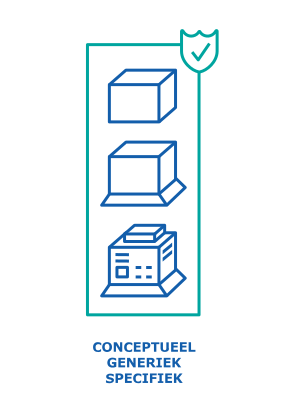
Types of objects

The BIM Content Layer provides objects with specific geometry and functionality that are utilised in BIM modelling software (BMSs) such as Revit, DDS-CAD, BricsCAD, Archicad, and others.

There is often confusion regarding objects, as there are different types that are used at various stages of the construction process.

Conceptual Object (CO)

A Conceptual Object (CO) is a raw geometric, parametric object with limited functionality that is used in conceptual design.

*This is not yet available in the TechBiM Content Library. In due course, additional funds will be sought to establish this.

Generic Object (GO)

A Generic Object (GO) is a geometric, parametric object with all necessary functionalities and can be filled with generic or specific data that is used in the design.

*This is the core business of TechBiM. The generic TechBiM objects are currently only available for the BIM modelling software Revit. As soon as TechBiM has the necessary additional funds, generic object libraries will also be provided for other BIM modelling software. A Technical Committee of BIM users manages the TechBiM library. The Technical Committee evaluates new or amended generic objects submitted by individual BIM users or Certified Content Providers.

Specific Object Geometry (SOg)

A Specific Object Geometry (SOg) is a geometric, whether parametric or not, object filled with specific data that is “slipped” over a Generic Object. The result appears as it does in reality and is primarily used for renderings.

*Certified Content Providers can assist manufacturers in streamlining this with the existing TechBiM Content.

Specific Object (SO)

A Specific Object (SO) is a geometric, parametric or otherwise object filled with specific data from a manufacturer. It also bears the name of the manufacturer, but that is not the only reason why a manufacturer would have a Specific Object created.

A specific object allows for the addition of functionality that the Generic Object does not possess, precisely because it is specific to that particular manufacturer and therefore does not apply universally.  For instance, an outdoor unit of an air conditioning system may consist of multiple units that collectively form a functional whole. Together, they generate a specific cooling capacity. In the generic library, they are therefore presented as a single bar shape.
A manufacturer who finds that their products are not adequately presented as a result can have a Specific Object created in accordance with TechBiM, which allows for the division of this volume into multiple sections and enables the adjustment of the spacing based on additional parameters within the object.

It is important to ensure that all connections are provided in the same manner as with the Generic Object. In this manner, the BIM modelling software recognises the SO in the same way as the GO, thereby ensuring interchangeability.

BIM-maturity

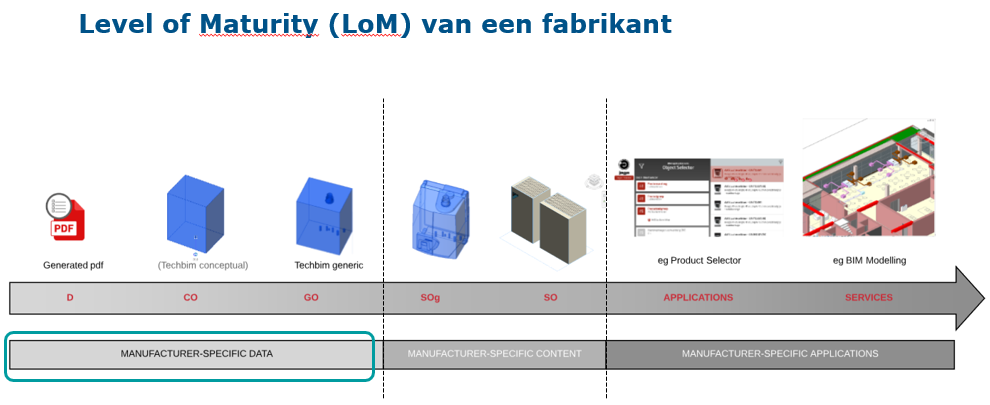
In the figure below, the various types of objects are arranged according to the BIM maturity of a Manufacturer:

Manufacturers wishing to be BIM-ready therefore begin by structuring their product data in accordance with TechBiM and making it available to the market. With Data and the Generic Objects (open-source) from TechBiM alone, BIM users can already make significant progress:

  • The prefabrication of pipes is feasible because the connection points are accurately represented in the model.
  • An assessment of the available space around the device is possible.
  • It is possible to perform calculations such as power, illumination level, etc. Even through applications other than those from the manufacturers supplying the data.